This is the multi-page printable view of this section. Click here to print.
Software Projects
1 - Qirab™ MetadataTool
Introduction
The Qirab™ Metadatatool is a webpage tool to allow the formatting of Dublin Core metadata using an Arabic language user interface.
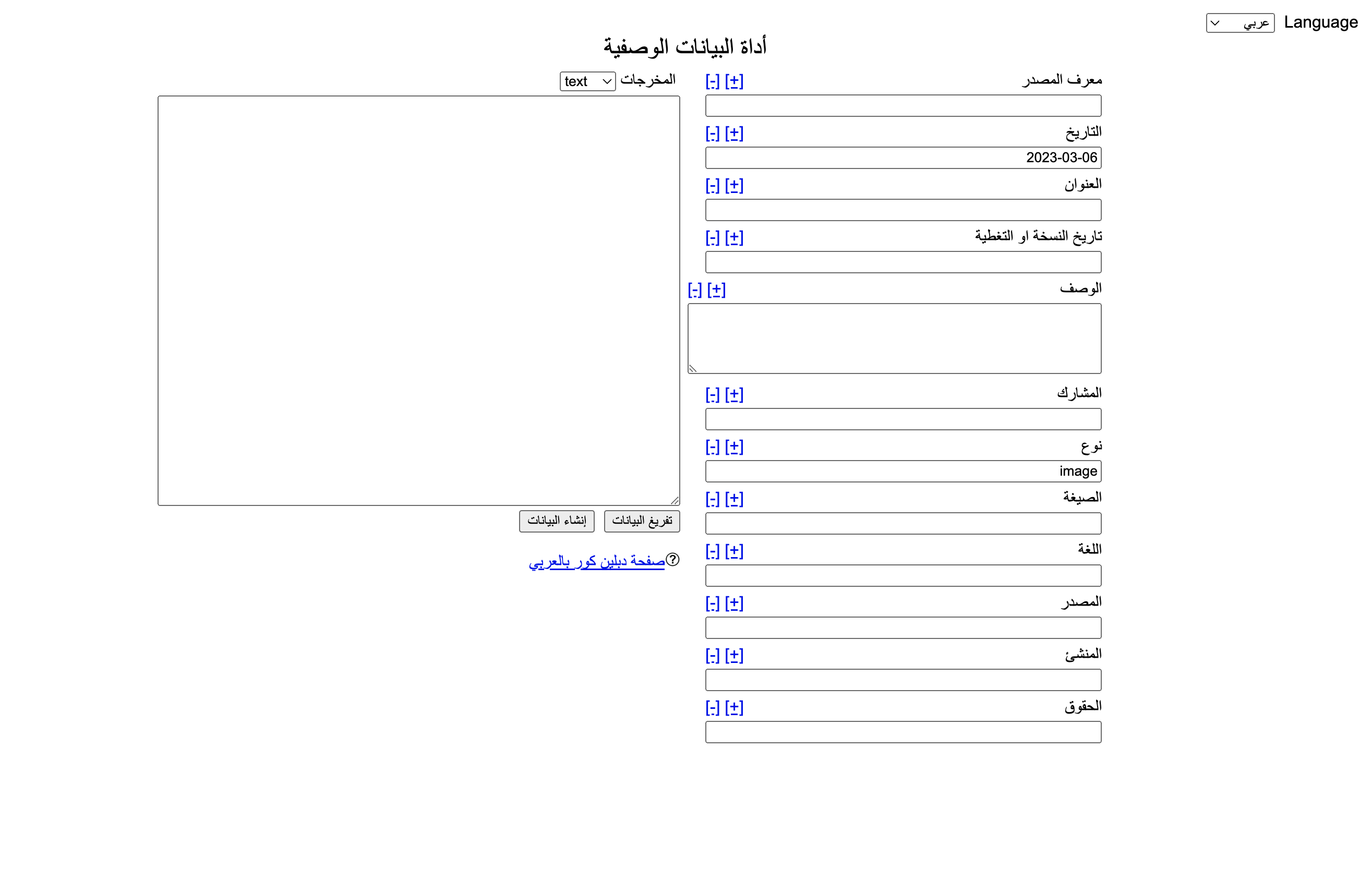
How To Use
To use the MetadataTool, download the entire source folder and open the index.html in your web browser. It works locally offline or when uploaded to a webserver.
Download
The MetadataTool is available from the Qirab™ Github page.
Credits
This project is a simplified adaptation of the Dublin Core Generator by nsteffal
License
It is released under the GNU General Public License (v2).
2 - BagIT Bash
BagIT Bash
bagit-bash is a bash shell implementation of BagIT
The goal of this project is to create full a BagIT spec implementation in the Bash shell. The BagIT spec is defined by RFC 8493 and this project aims to have feature parity with the python implementation of BagIT.
Requirements
Bash 4.0 or later is required
Checking Your Bash Version
bash --version
Features
- Create BagIt bags from a directory.
- Validate existing BagIt bags.
- Support for a wide range of checksum algorithms including MD5, SHA-1, SHA-256, SHA-512, SHAKE-128, SHAKE-256, SHA3-224, SHA3-256, SHA3-384, SHA3-512, BLAKE2b, BLAKE2s, SHA-224, and SHA-384.
- Fast validation mode to only check the payload-oxum.
- Completeness-only validation mode to check payload completeness without checksum validation.
- Parallel checksum calculation for faster processing.
- Support for adding various optional BagIt metadata fields.
Usage
./bagit.sh [options] <directory>
Options
-h,--help: Show the help message.-v,--version: Show version and exit.-p,--processes PROCESSES: Use multiple processes to calculate checksums faster (default: 1).-l,--log LOG: The name of the log file (default: stdout).-q,--quiet: Suppress all progress information other than errors.-V,--validate: Validate existing bags in the provided directories instead of creating new ones.-f,--fast: Modify--validatebehaviour to only test whether the bag directory has the number of files and total size specified in Payload-Oxum without performing checksum validation to detect corruption.-c,--completeness-only: Modify--validatebehaviour to test whether the bag directory has the expected payload specified in the checksum manifests without performing checksum validation to detect corruption.-t,--localtemp: Create temporary directory in the bag directory instead of the system temp folder. Useful for SMB shares or cross-filesystem scenarios.
Checksum Algorithms
Select the manifest algorithms to be used when creating bags (default=sha256).
--shake_256: Generate SHAKE_256 manifest when creating a bag.--sha256: Generate SHA-256 manifest when creating a bag.--sha3_512: Generate SHA3_512 manifest when creating a bag.--sha1: Generate SHA-1 manifest when creating a bag.--shake_128: Generate SHAKE_128 manifest when creating a bag.--sha3_224: Generate SHA3_224 manifest when creating a bag.--sha3_384: Generate SHA3_384 manifest when creating a bag.--blake2s: Generate BLAKE2S manifest when creating a bag.--sha3_256: Generate SHA3_256 manifest when creating a bag.--sha512: Generate SHA-512 manifest when creating a bag.--md5: Generate MD-5 manifest when creating a bag.--blake2b: Generate BLAKE2B manifest when creating a bag.--sha384: Generate SHA-384 manifest when creating a bag.--sha224: Generate SHA-224 manifest when creating a bag.
Optional Bag Metadata
--source-organization SOURCE_ORGANIZATION--organization-address ORGANIZATION_ADDRESS--contact-name CONTACT_NAME--contact-phone CONTACT_PHONE--contact-email CONTACT_EMAIL--external-description EXTERNAL_DESCRIPTION--external-identifier EXTERNAL_IDENTIFIER--bag-size BAG_SIZE--bag-group-identifier BAG_GROUP_IDENTIFIER--bag-count BAG_COUNT--internal-sender-identifier INTERNAL_SENDER_IDENTIFIER--internal-sender-description INTERNAL_SENDER_DESCRIPTION--bagit-profile-identifier BAGIT_PROFILE_IDENTIFIER
Download
bagit-bash is available from the Qirab™ Github page.
License
bagit-bash is released under the Creative Commons Zero v1.0 Universal license.
https://github.com/Qirab/bagit-bash
bagit-bash is based on the Library of Congress bagit-python version which is in the Public Domain.
3 - Dublin Core Bash
dublincore-bash
A bash script to read, validate and write Dublin Core metadata.
Specifications
- Requires bash 4.0 or higher (uses associative arrays)
- Follows the “Guidelines for implementing Dublin Core™ in XML” 2003-04-02 https://www.dublincore.org/specifications/dublin-core/dc-xml-guidelines/2003-04-02/
- Follows the “DCMI Metadata Terms” 2008-01-14 https://www.dublincore.org/specifications/dublin-core/dcmi-terms/2008-01-14/
Usage
Basic Operations
# Read and display metadata
dublincore.sh --read metadata.xml

# Validate Dublin Core compliance
dublincore.sh --validate --read metadata.xml

# Convert between formats
dublincore.sh --read metadata.txt --format xml --output metadata.xml
dublincore.sh --read metadata.xml --format html --output metadata.html
dublincore.sh --read metadata.html --format text --output metadata.txt

# Extract specific term
dublincore.sh --term "title" --read metadata.xml
dublincore.sh --term "creator" --read metadata.txt

# Extract term with clean output (values only, semicolon-separated if multiple)
dublincore.sh --term "title" --clean --read metadata.xml
dublincore.sh --term "creator" --clean --read metadata.xml  # Multiple values: "Smith, Jane;Johnson, Bob"

# Select specific term value by position (1-based index)
dublincore.sh --term "creator" --select 1 --read metadata.xml          # Gets first creator value
dublincore.sh --term "creator" --select 2 --read metadata.xml          # Gets second creator value
dublincore.sh --term "creator" --select 2 --clean --read metadata.xml  # Gets second creator, clean output
dublincore.sh --term "identifier" --select 1 --clean --read metadata.xml  # Gets first identifier, values only

# Create subset files with multiple terms
dublincore.sh --read input.xml --term title --term creator --format xml --output subset.xml
dublincore.sh --read input.xml --term title --term date --term publisher --format text --output subset.txt
dublincore.sh --read input.xml --term abstract --term license --format html --output subset.html

# Multiple terms with verbose output for debugging
dublincore.sh --read input.xml --term title --term creator --term subject --format xml --output subset.xml --verbose

# Create new Dublin Core files from scratch (create mode)
dublincore.sh --create --term title "My Document" --term creator "John Doe" --format xml --output new.xml
dublincore.sh --create --term title "Research Paper" --term date "2024-01-15" --term publisher "Academic Press" --format text --output new.txt
dublincore.sh --create --term title "Web Resource" --term abstract "Summary text" --format html --output new.html
Command Line Options
--help- Display help message and usage guide--read FILE- Read and display Dublin Core metadata from FILE--validate- Validate Dublin Core metadata (use with –read)--format FORMAT --output FILE- Convert metadata to FORMAT and write to FILE (xml, text, html)--formatand--outputmust be used together
--term TERM- Extract specific Dublin Core term OR select term for subset operation- Can be used multiple times for subset creation or create mode
--clean- Output only term values, semicolon-separated if multiple (use with single –term)--select N- Select Nth value whenterm has multiple values (1-based index, use with single –term)- Syntax:
--term TERM --select N --read FILE
- Syntax:
--create- Create new Dublin Core file from –term flags (no input file required)--verbose- Enable verbose output--debug- Enable debug output
Operation Modes
- Read Mode - Display all metadata from input file
- Validate Mode - Check Dublin Core compliance
- Convert Mode - Transform entire file between formats
- Extract Mode - Get values for a single term (single –term only)
- Subset Mode - Create new file with only selected terms (multiple –term with –format)
- Create Mode - Create new Dublin Core file from scratch (–create with –term flags)
Supported Dublin Core Terms
Dublin Core 1.1 Elements (15)
title, creator, subject, description, publisher, contributor, date, type, format, identifier, source, language, relation, coverage, rights
DCMI Terms (Extended Elements)
abstract, accessRights, alternative, audience, available, bibliographicCitation, conformsTo, created, extent, hasVersion, instructionalMethod, issued, license, mediator, medium, modified, provenance, rightsHolder, spatial, tableOfContents, temporal, valid
Namespace Prefixes
dc:- Dublin Core 1.1 elements (http://purl.org/dc/elements/1.1/)dcterms:- DCMI Terms (http://purl.org/dc/terms/)
Term Usage
- Use element names without prefixes in –term flags (e.g.,
--term title,--term abstract) - Script automatically detects appropriate namespace (dc: or dcterms:)
- All terms support multiple values separated by semicolon (;) character
Supported Formats
- XML - Dublin Core XML with dc: and dcterms: namespaces
- Text - Simple key: value format
- HTML - Meta tags with DC. and dcterms. prefixes
Download
dublincore-bash is available from the Qirab™ Github page.
License
This project is released into the public domain under CC0 1.0 Universal.

To the extent possible under law, the authors have waived all copyright and related or neighboring rights to this work. You can copy, modify, distribute and perform the work, even for commercial purposes, all without asking permission.